Likee Direct Top-Up Activation Guide
1
Selectează suma:
- Alege numărul de Diamonds pe care vrei să îi cumperi.
- Verifică selecția înainte de a continua.
2
Introdu datele contului:
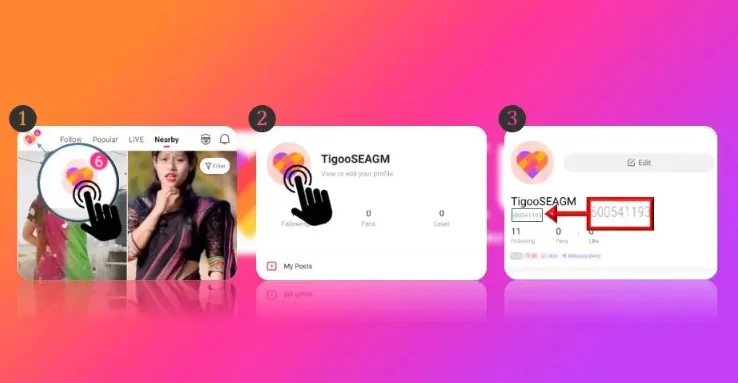
- Introdu Likee ID-ul tău în câmpul corespunzător.
- Deschide aplicația și apasă pe poza de profil din stânga sus.
- Selectează "View or Edit your Profile" pentru a vedea ID-ul sub nume.
3
Finalizează plata:
- Continuă la plată după introducerea datelor.
- Alege metoda de plată și confirmă tranzacția.
4
Primește Diamonds:
- După plata reușită, Diamonds vor fi adăugate în cont.
- Procesarea este de obicei rapidă.