Mobile Legends Direct Top-Up Activation Guide
1
Selectează pachetul de Diamonds:
- Alege cantitatea de Diamonds pentru Mobile Legends (ML) pe care vrei să o cumperi din lista de pachete disponibile.
- Asigură-te că pachetul de Diamonds selectat se potrivește bugetului tău și nevoilor tale din joc (skin-uri, Battle Pass etc.).
2
Introdu ML User ID și Zone ID:
- Folosește contul tău pentru a te autentifica în Mobile Legends: Bang Bang.
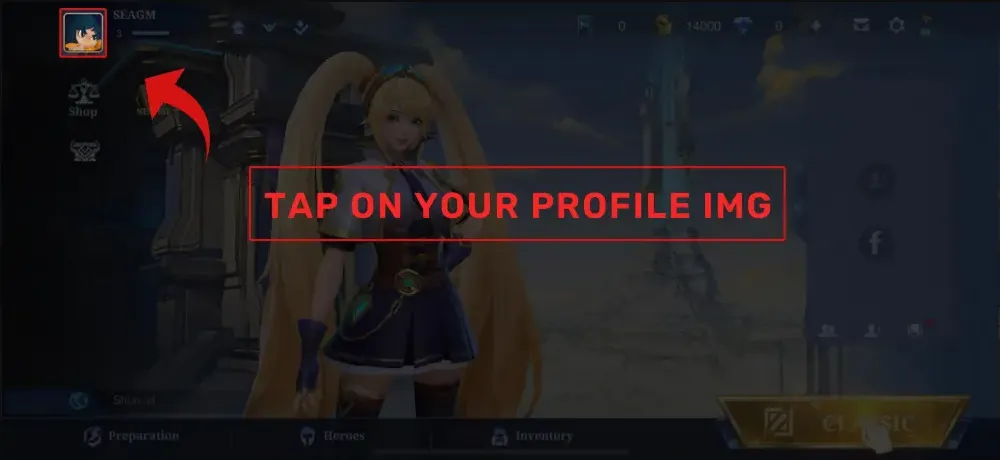
- Apasă pe avatarul tău din colțul stânga sus al ecranului principal pentru a deschide profilul.
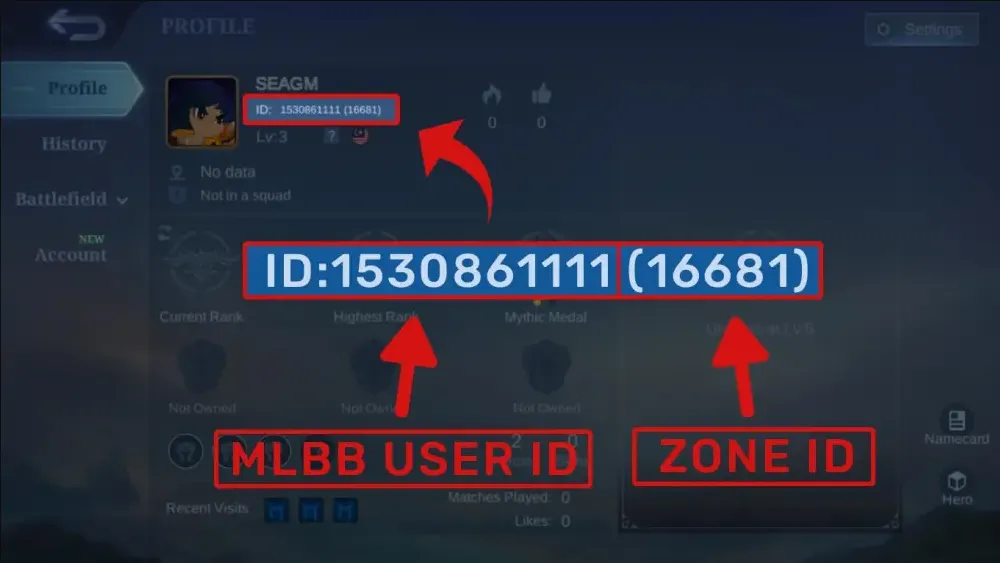
- Găsește detaliile afișate, de exemplu, ca User ID: 12345678 (1234) și introdu User ID-ul și Zone ID-ul exact așa cum apar.
3
Confirmă comanda și plătește:
- Mergi la checkout după ce ai introdus informațiile ID.
- Selectează metoda de plată preferată (cum ar fi card, e-wallet sau opțiuni locale de plată).
- Confirmă plata și așteaptă ca aceasta să fie procesată cu succes.
4
Primește Diamonds și verifică:
- După finalizarea plății, Diamonds ML cumpărate vor fi creditate în scurt timp pe contul tău MLBB.
- Autentifică-te din nou în joc (sau repornește-l) și verifică soldul de Diamonds în partea de sus a ecranului lobby.
- Dacă Diamonds nu ajung după ceva timp, verifică din nou dacă ai folosit User ID-ul și Zone ID-ul corecte și contactează suportul magazinului, dacă este necesar.