Persona 5: The Phantom X Direct Top-Up Activation Guide
1
Select Alien Crystals:
- Choose the Persona 5: The Phantom X Alien Crystal denomination you want to purchase.
- Review your selection before proceeding.
2
Enter Game ID and Character ID:
- Enter your Persona 5: The Phantom X Game ID and Character ID in the required fields.
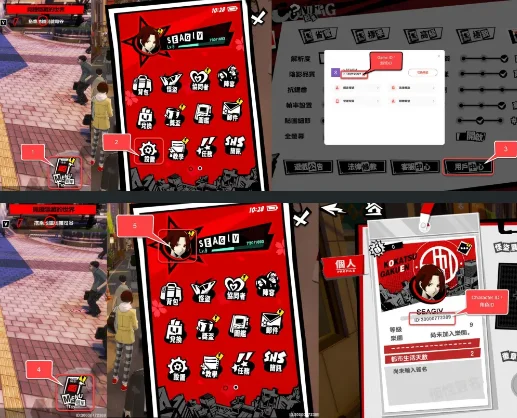
- To find your Game ID, log in to the game using your account.
- Tap the Menu icon in the bottom-right corner of the screen.
- Open Settings and select the User Center icon.
- Your Game ID will be displayed on this screen.
- To find your Character ID, tap the Menu icon again.
- Select the Avatar icon.
- Your Character ID will be displayed on this screen.
3
Complete Payment:
- Proceed to checkout after entering your Game ID and Character ID.
- Select your preferred payment method and confirm the purchase.
4
Receive Alien Crystals:
- Once payment is completed, the Persona 5: The Phantom X Alien Crystals will be credited to your account shortly.
- Check your in-game balance to confirm delivery.