Identity V Direct Top-Up Activation Guide
1
Wybierz pakiet Echoes:
- Wybierz z dostępnych opcji liczbę Identity V Echoes, którą chcesz kupić.
- Upewnij się, że wybrany pakiet pasuje do Twojego budżetu i potrzeb w grze.
2
Wpisz User ID i serwer gry:
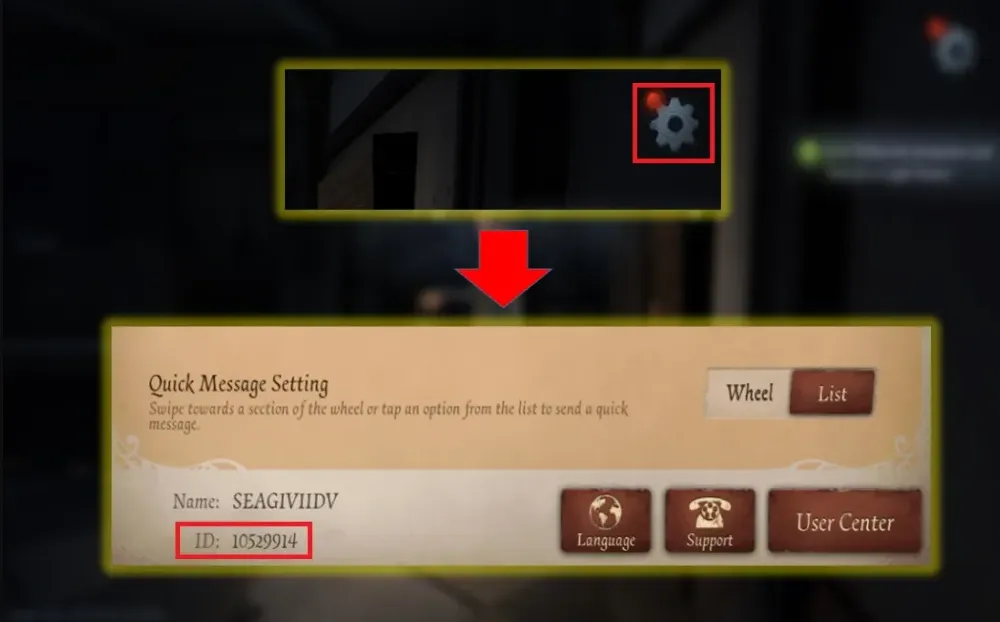
- Zaloguj się do Identity V na swoje konto.
- Otwórz menu Ustawienia w grze.
- W sekcji Games znajdź swój User ID i zanotuj serwer gry, a następnie wpisz oba dane dokładnie tak, jak są wyświetlane, w formularzu doładowania.
- Upewnij się, że Twój User ID i nazwa użytkownika są poprawne, aby uniknąć opóźnień w otrzymaniu Echoes.
3
Potwierdź zamówienie i zapłać:
- Przejdź do checkoutu po wpisaniu User ID i serwera gry.
- Wybierz preferowaną metodę płatności z dostępnych opcji.
- Potwierdź płatność i poczekaj, aż zostanie poprawnie przetworzona; w tym czasie możesz pozostać zalogowany(-a) do gry.
4
Odbierz Echoes i zweryfikuj:
- Po zakończeniu płatności zakupione Identity V Echoes zostaną wkrótce dodane do Twojego konta Identity V.
- Uruchom grę ponownie lub odśwież ją i sprawdź saldo Echoes, aby potwierdzić, że dotarły.
- Jeśli Echoes nie pojawią się po pewnym czasie, ponownie sprawdź, czy użyto poprawnego User ID i właściwego serwera gry, a w razie potrzeby skontaktuj się ze wsparciem sklepu.