PUBG Mobile Direct Top-Up
1
Selecciona producto UC:
- Elige la denominación de Unknown Cash (UC) que deseas comprar.
- Continúa solo después de confirmar los detalles del producto.
2
Ingresa Player ID:
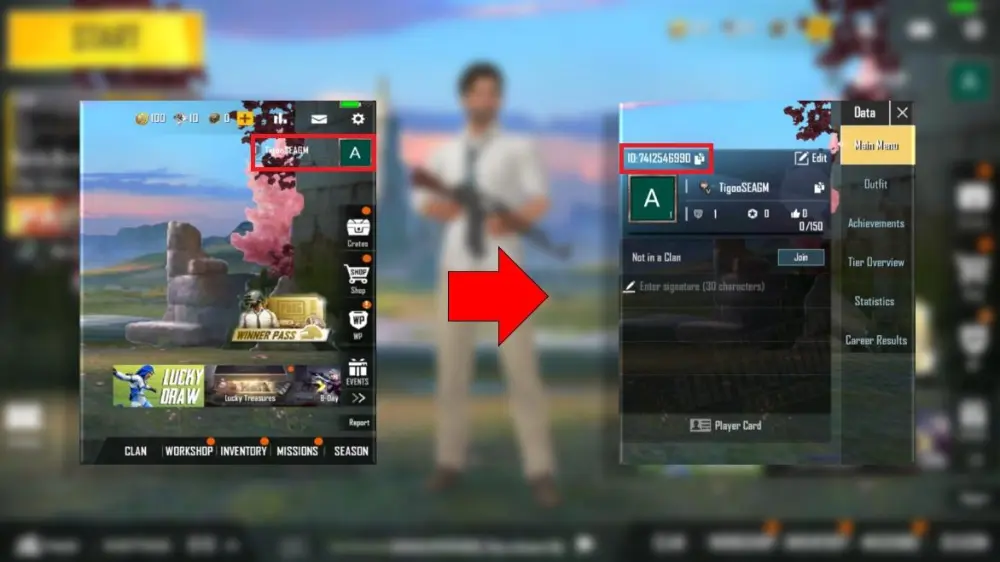
- Encuentra tu Player ID de PUBG Mobile iniciando sesión en el juego y abriendo tu perfil de jugador.
- Copia el ID que se muestra prominentemente sobre tu avatar y nombre de usuario.
- Ingresa exactamente en el formulario de recarga – verifica dos veces para evitar errores.
3
Recibe UC y verifica:
- Espera brevemente – los créditos UC se añaden a tu cuenta de PUBG Mobile poco después de confirmar el pago.
- Inicia sesión en el juego y verifica el saldo de UC en la esquina superior derecha.
- Soluciona problemas si es necesario: Actualiza el juego, confirma que el Player ID es correcto.