


State of Survival Direct Top-Up Activation Guide
1
Select Diamonds Package:
- Choose the Diamonds package you want to purchase for State of Survival.
- Confirm your selection before continuing to the next step.
2
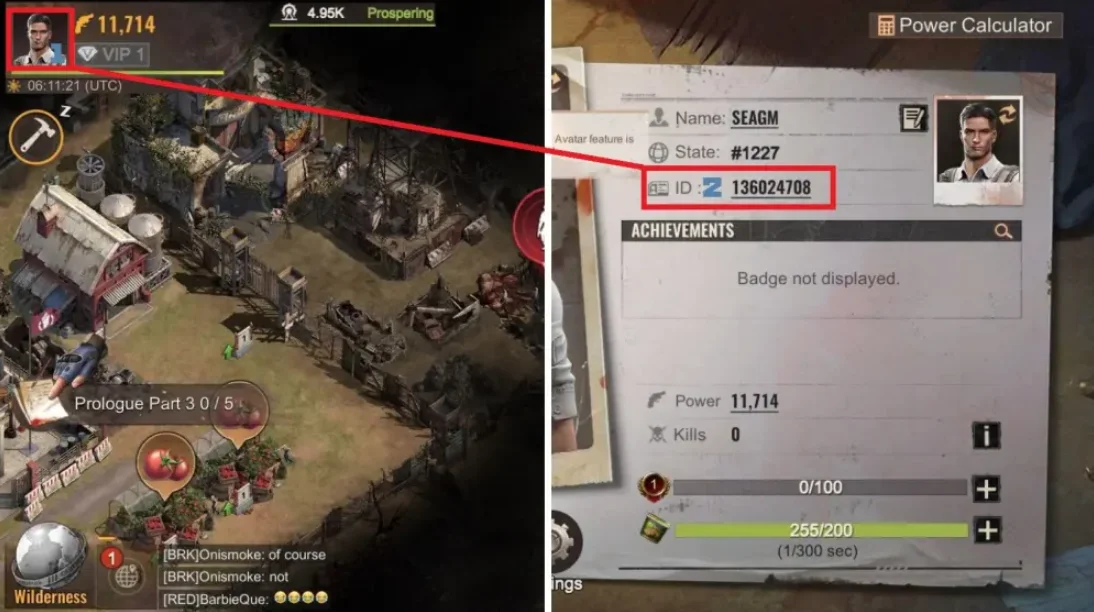
Enter Survival ID:
- Provide your Survival ID (also called Chief ID or User ID) accurately.
- To find it, log in to the game, tap the avatar in the top-left corner, and check the ID shown below your name and state.
3
Complete Purchase:
- Proceed to checkout after entering your account details.
- Select your preferred payment method and confirm the order.
4
Receive Diamonds:
- Wait for the payment to be processed successfully.
- The Diamonds will be added to your State of Survival account shortly.


