Tiles Survive! Direct Top-Up Activation Guide
1
Seleccionar Waypoints:
- Elige la denominación de Tiles Survive! Waypoints.
- Confirma la selección antes de continuar.
2
Ingresar UID y nombre del personaje:
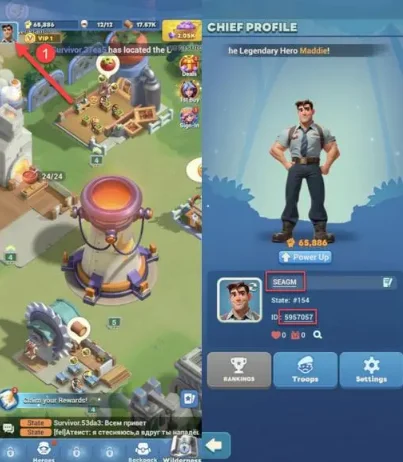
- Introduce tu UID y Character Name.
- Para encontrarlos, inicia sesión y toca el icono Profile en la esquina superior izquierda.
- Tu UID se mostrará en la página del perfil.
3
Completar el pago:
- Accede al pago después de ingresar los datos.
- Selecciona tu método de pago preferido y confirma la compra.
4
Recibir Waypoints:
- Una vez realizado el pago, los Tiles Survive! Waypoints se acreditarán en tu cuenta en breve.
- Verifica tu saldo dentro del juego.