Skip to main content Skip to search Skip to main navigation

Activation guides

Back

Tom and Jerry: Chase Direct Top-Up Activation Guide

1

Select Diamonds:

  • Choose the Tom and Jerry Chase Diamond denomination you want to purchase.
  • Review your selection before proceeding.
2

Enter User ID and Game Server:

  • Enter your Tom and Jerry Chase User ID and select your Game Server.
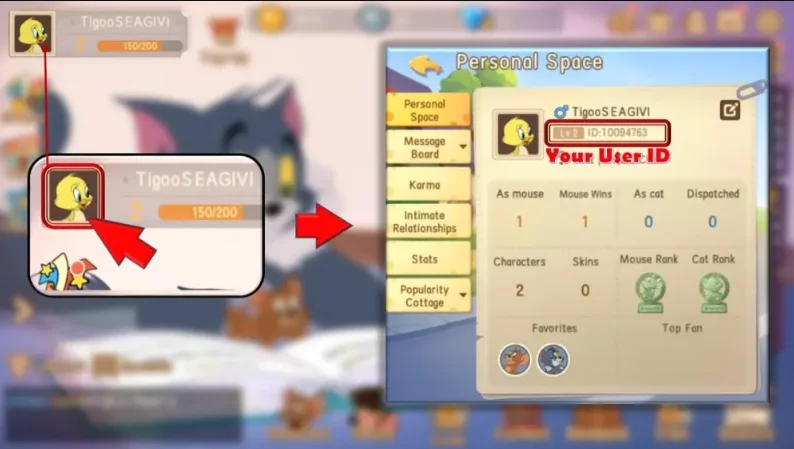
  • To find your User ID, log in to the game using your account.
  • Tap your Avatar in the top-left corner of the screen.
  • Your Tom and Jerry Chase User ID will be displayed on this page.
3

Complete Payment:

  • Proceed to checkout after entering your User ID and selecting your Game Server.
  • Select your preferred payment method and confirm the purchase.
4

Receive Diamonds:

  • Once payment is completed, the Diamonds will be added to your Tom and Jerry Chase account instantly.
  • Check your in-game balance to confirm delivery.
Minecraft: Java & Bedrock Edition (PC)
-42%
Microsoft Store Microsoft Store
Microsoft Store
GLOBAL
29.99 € 17.26 €
14.67 € with
Xbox Game Pass Ultimate - 1 Month Non-Stackable
-54%
Microsoft Store Microsoft Store
Microsoft Store
EUROPE
26.99 € 12.29 €
11.31 € with
Xbox Game Pass Ultimate - 1 Month Non-Stackable
-68%
Microsoft Store Microsoft Store
Microsoft Store
UNITED STATES
26.99 € 8.54 €
7.86 € with
Xbox Game Pass Ultimate - 1 Month Non-Stackable
-55%
Microsoft Store Microsoft Store
Microsoft Store
GLOBAL
26.99 € 12.19 €
11.21 € with
The Blood of Dawnwalker (PC)
-37%
Steam Steam
Steam
EUROPE
69.99 € 44.35 €
41.69 € with
1x Master Mystery Steam Key
-33%
Steam Steam
Steam
GLOBAL
5.99 € 3.99 €
3.39 € with
Tinder Gold - 1 Month
-82%
Tinder Tinder
Tinder
EUROPE
20.99 € 3.72 €
3.16 € with
