










































Magic Chess: Go Go Activation Guide
1
Select Diamonds:
- Choose the Diamonds amount you want to purchase in Magic Chess: Go Go.
- Check your selection before continuing.
2
Enter Player ID and Server:
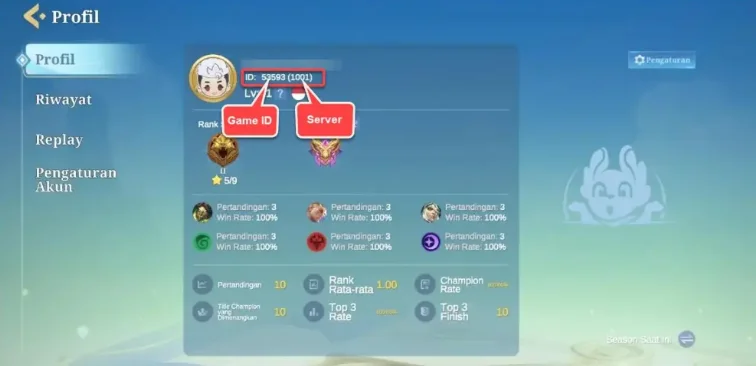
- Enter your Player ID and select the correct server.
- To find them, log in to the game and tap the Avatar icon in the upper left corner to view your Game ID and server.
3
Complete Payment:
- Proceed to checkout after entering your details.
- Select your payment method and confirm the purchase.
4
Receive Diamonds:
- Wait for the payment to be processed.
- Your purchased Diamonds will be credited to your account shortly.