






















































PUBG Mobile Pass Activation Guide
1
Select the Royale Pass:
- Choose the PUBG Mobile Royale Pass Pack you want to purchase.
- Make sure the selected option matches the current season and your account.
2
Enter your Player ID:
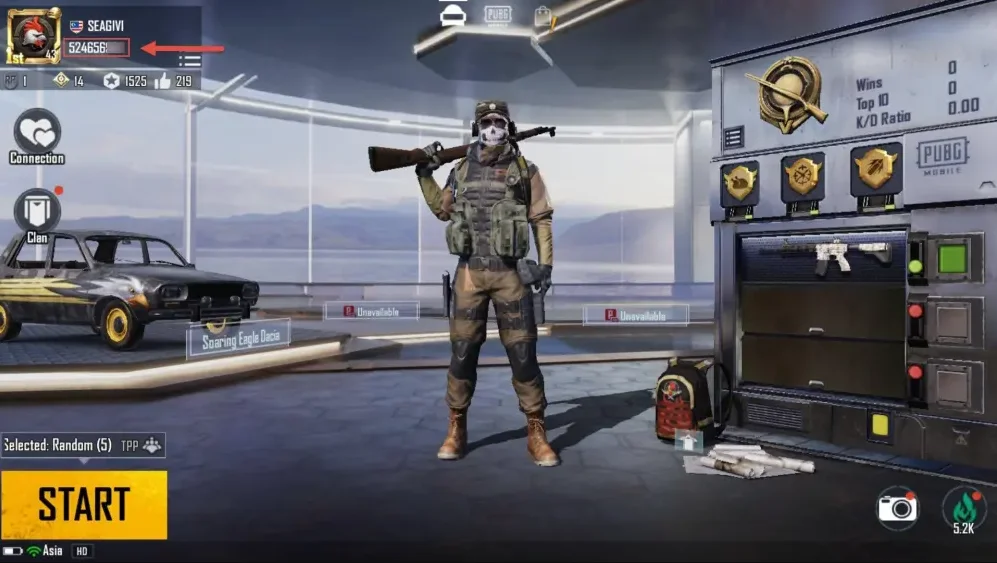
- Log in to PUBG Mobile and open your player profile.
- Your Player ID will be displayed on the profile screen.
- Enter the Player ID exactly as shown to make sure the Royale Pass is sent to the correct account.
3
Complete the payment:
- Check the selected Royale Pass Pack and confirm the Player ID.
- Select your payment method and confirm the order.
4
Receive the Royale Pass in game:
- After the payment is processed, the Royale Pass will be added to your PUBG Mobile account.
- The Royale Pass Pack can only be purchased once per season and cannot be upgraded after activation.
- Stay logged in and check your account to confirm the activation.