












































































Heroes Evolved Direct Top-Up Activation Guide
1
Select Token:
- Choose the Token amount you want to purchase in Heroes Evolved Mobile.
- Review your selection before continuing.
2
Enter Player ID and Server:
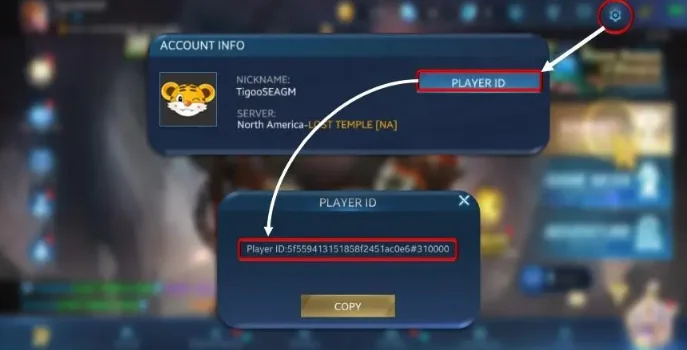
- Enter your Player ID and select the correct game server.
- To find your Player ID, log in to the game, open Settings in the top-right corner, then check Player ID under Account Info.
3
Complete Payment:
- Proceed to checkout after entering your details.
- Select your payment method and confirm the purchase.
4
Receive Token:
- Wait for the payment to be processed.
- Your purchased Token will be added to your Heroes Evolved Mobile account shortly.